Form
Renders a <form> element that wraps child field components. Acts as a container for fields, fieldsets, buttons, and nonces.
Class: PinkCrab\Form_Components\Element\Form
Component: PinkCrab\Form_Components\Component\Form\Form_Component
Make helper: Make::form( 'name', fn(Form $f) => $f->... )
Basic Usage
$this->component( new Form_Component(
        Form::make( 'contact' )
            ->method( 'POST' )
            ->action( '/submit' )
            ->fields(
                Text::make( 'name' )
                    ->label( 'Name' )
                    ->required( true ),
                Email::make( 'email' )
                    ->label( 'Email' )
                    ->required( true ),
                Textarea::make( 'message' )
                    ->label( 'Message' )
                    ->rows( 4 ),
                Button::make( 'submit' )
                    ->type( 'submit' )
                    ->text( 'Send' )
            )
    ) )
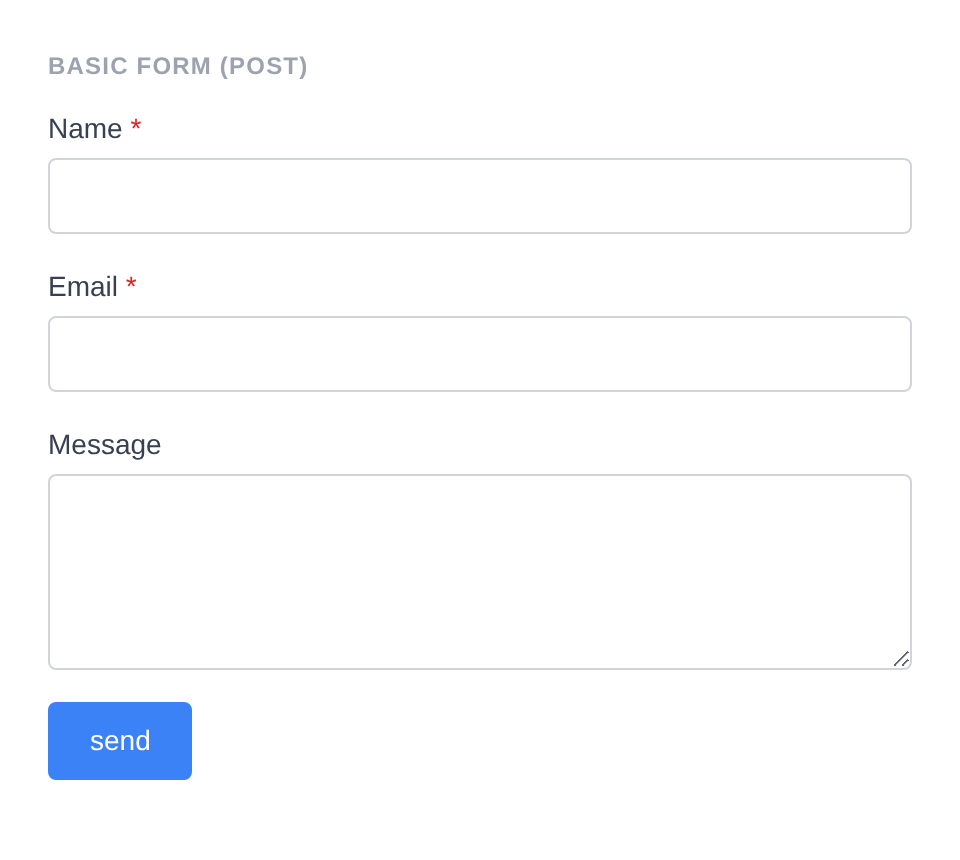
Generated HTML
<form id="form-contact" class="pc-form" method="POST" action="/submit">
    <div id="form-field_name" class="pc-form__element pc-form__element--text_input">
        <label for="name" class="pc-form__label">Name</label>
            <input type="text" name="name" class="form-control text-input pc-form__element__field pc-form__element__field--text_input" list="_name__list" required="" />
        </div>
        <div id="form-field_email" class="pc-form__element pc-form__element--email_input">
            <label for="email" class="pc-form__label">Email</label>
                <input type="email" name="email" class="form-control email-input pc-form__element__field pc-form__element__field--email_input" list="_email__list" required="" />
            </div>
            <div id="form-field_message" class="pc-form__element pc-form__element--textarea">
                <label for="message" class="pc-form__label">Message</label>
                    <textarea name="message" class="form-control textarea pc-form__element__field pc-form__element__field--textarea" rows="4" >
                    </textarea>
                </div>
                <div id="form-buttonsubmit" class="pc-form__element pc-form__element--button">
                    <button type="submit" name="submit" class="pc-form__button" >send</button>
                    </div>
                </form>
Using Make Helper
use PinkCrab\Form_Components\Util\Make;
use PinkCrab\Form_Components\Element\Field\Input\Text;
use PinkCrab\Form_Components\Element\Button;

$this->component( Make::form( 'contact', fn( $f ) => $f
    ->action( admin_url( 'admin-post.php' ) )
    ->fields(
        Text::make( 'name' )->label( 'Name' ),
        Text::make( 'email' )->label( 'Email' ),
        Button::make( 'submit' )->type( 'submit' )->text( 'Send' ),
    )
) );
Methods
method( string $method )
Sets the HTTP method for the form. Defaults to POST. Automatically uppercased.
Form::make( 'search_form' )
    ->method( 'GET' )
    ->action( '/search' )
    ->fields(
        Text::make( 'query' )
            ->label( 'Search' )
            ->placeholder( 'Search...' ),
        Button::make( 'go' )
            ->type( 'submit' )
            ->text( 'Go' )
    )
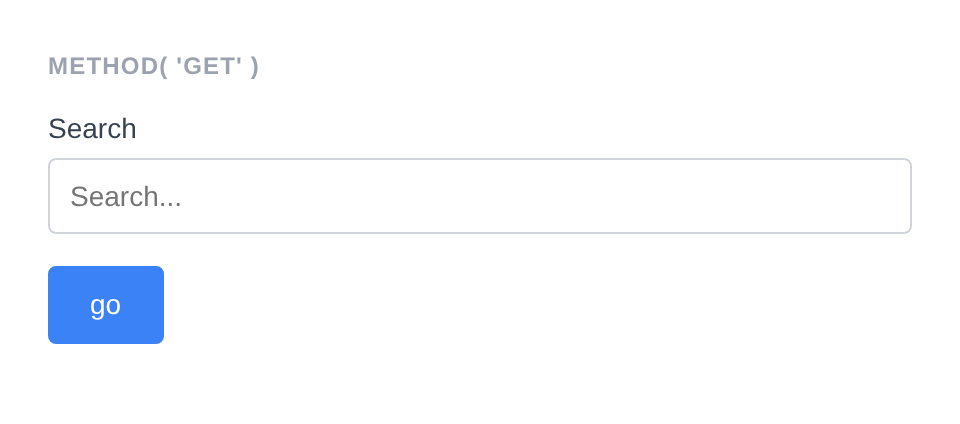
Generated HTML
<form id="form-search_form" class="pc-form" method="GET" action="/search">
    <div id="form-field_query" class="pc-form__element pc-form__element--text_input">
        <label for="query" class="pc-form__label">Search</label>
            <input type="text" name="query" class="form-control text-input pc-form__element__field pc-form__element__field--text_input" list="_query__list" placeholder="Search..." />
        </div>
        <div id="form-buttongo" class="pc-form__element pc-form__element--button">
            <button type="submit" name="go" class="pc-form__button" >go</button>
            </div>
        </form>
action( string $action )
Sets the form action URL where the form data is submitted.
Form::make( 'contact' )
    ->action( admin_url( 'admin-post.php' ) )
    ->fields(
        Text::make( 'name' )->label( 'Name' ),
    )
Generated HTML
<form id="form-contact" class="pc-form" method="POST" action="https://example.com/wp-admin/admin-post.php">
    <div id="form-field_name" class="pc-form__element pc-form__element--text_input">
        <label for="name" class="pc-form__label">Name</label>
        <input type="text" name="name"
            class="form-control text-input pc-form__element__field pc-form__element__field--text_input"
        />
    </div>
</form>
enctype( string $enctype )
Sets the form encoding type. Required for file uploads.
Form::make( 'upload_form' )
    ->method( 'POST' )
    ->action( '/upload' )
    ->enctype( 'multipart/form-data' )
    ->fields(
        Text::make( 'file_label' )
            ->label( 'File Label' ),
        Button::make( 'upload' )
            ->type( 'submit' )
            ->text( 'Upload' )
    )
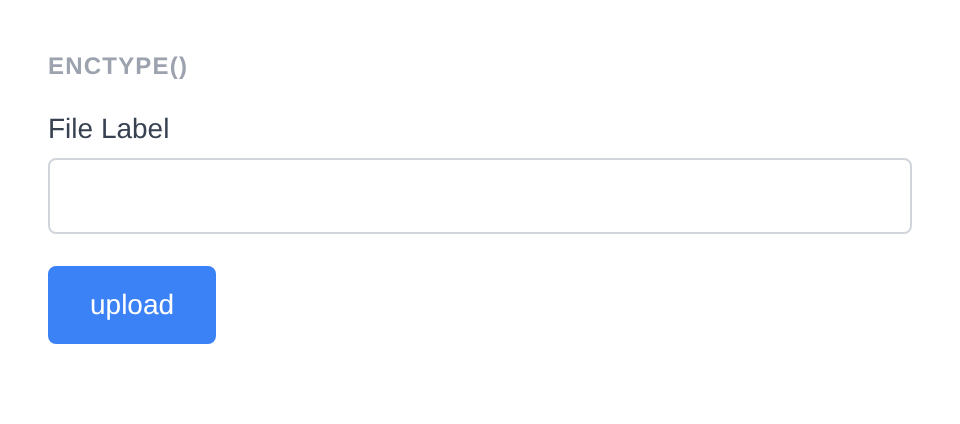
Generated HTML
<form id="form-upload_form" class="pc-form" method="POST" action="/upload" enctype="multipart/form-data">
    <div id="form-field_file_label" class="pc-form__element pc-form__element--text_input">
        <label for="file_label" class="pc-form__label">File Label</label>
            <input type="text" name="file_label" class="form-control text-input pc-form__element__field pc-form__element__field--text_input" list="_file_label__list" />
        </div>
        <div id="form-buttonupload" class="pc-form__element pc-form__element--button">
            <button type="submit" name="upload" class="pc-form__button" >upload</button>
            </div>
        </form>
fields( Element …$elements )
Adds child elements (fields, buttons, nonces, fieldsets, raw HTML) to the form. Accepts any number of Element instances. Child elements inherit the form’s style unless they have an explicit style set.
Form::make( 'secure_form' )
    ->method( 'POST' )
    ->fields(
        Hidden::make( 'form_id' )
            ->set_existing( '42' )
            ->show_wrapper( false ),
        Nonce::make( 'save_action', 'form_nonce' ),
        Text::make( 'title' )
            ->label( 'Title' ),
        Button::make( 'save' )
            ->type( 'submit' )
            ->text( 'Save' )
    )
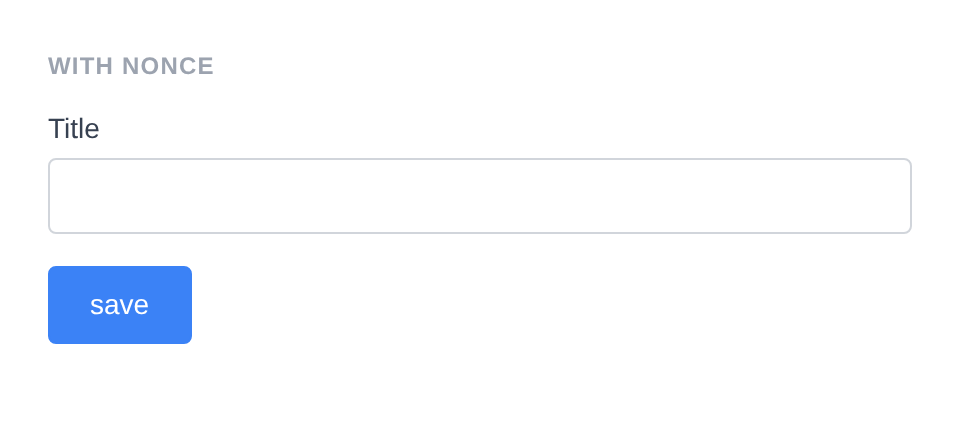
Generated HTML
<form id="form-secure_form" class="pc-form" method="POST">
    <input type="hidden" name="form_id" class="form-control hidden-input pc-form__element__field pc-form__element__field--hidden_input" value="42" />
    <input type="hidden" id="form_nonce" name="form_nonce" value="12e9c3e24f" />
    <input type="hidden" name="_wp_http_referer" value="/?docs-screenshot=form" />
    <div id="form-field_title" class="pc-form__element pc-form__element--text_input">
        <label for="title" class="pc-form__label">Title</label>
            <input type="text" name="title" class="form-control text-input pc-form__element__field pc-form__element__field--text_input" list="_title__list" />
        </div>
        <div id="form-buttonsave" class="pc-form__element pc-form__element--button">
            <button type="submit" name="save" class="pc-form__button" >save</button>
            </div>
        </form>
add_field( string $key, string $field_class, ?callable $config = null )
Adds a field by class name with an optional configuration callback.
use PinkCrab\Form_Components\Element\Field\Input\Text;

Form::make( 'contact' )
    ->add_field( 'name', Text::class, fn( $f ) => $f
        ->label( 'Name' )
        ->required()
    )
Generated HTML
<form id="form-contact" class="pc-form" method="POST">
    <div id="form-field_name" class="pc-form__element pc-form__element--text_input">
        <label for="name" class="pc-form__label">Name</label>
        <input type="text" name="name"
            class="form-control text-input pc-form__element__field pc-form__element__field--text_input"
            required=""
        />
    </div>
</form>
before( string $html ) / after( string $html )
HTML content before or after the form’s child elements, rendered inside the <form> tag.
Form::make( 'wrapped_form' )
    ->method( 'POST' )
    ->before( '<div style="padding:8px 0;color:#374151;font-weight:500;">Contact Us
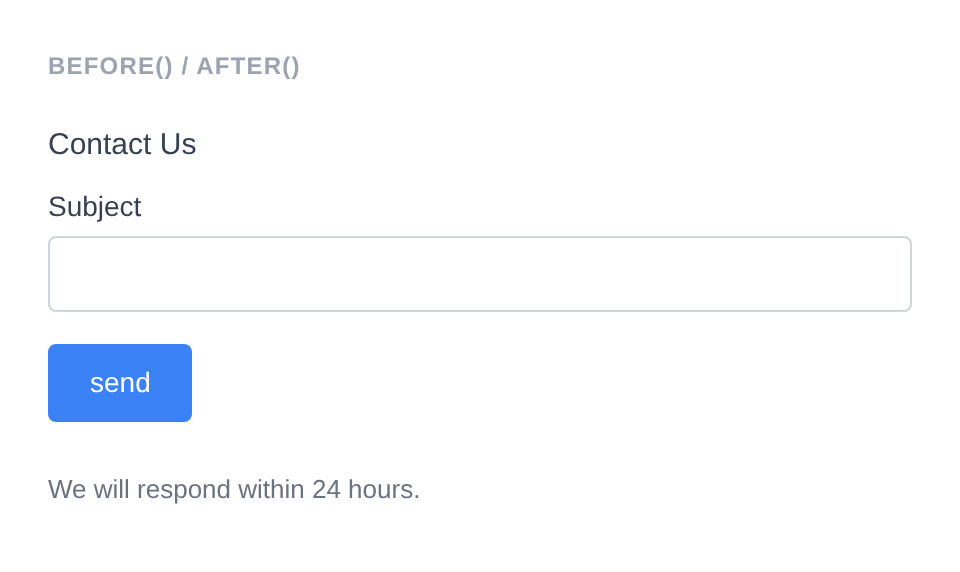
Generated HTML
<form id="form-wrapped_form" class="pc-form" method="POST">
    <div style="padding:8px 0;color:#374151;font-weight:500">Contact Us</div>
        <div id="form-field_subject" class="pc-form__element pc-form__element--text_input">
            <label for="subject" class="pc-form__label">Subject</label>
                <input type="text" name="subject" class="form-control text-input pc-form__element__field pc-form__element__field--text_input" list="_subject__list" />
            </div>
            <div id="form-buttonsend" class="pc-form__element pc-form__element--button">
                <button type="submit" name="send" class="pc-form__button" >send</button>
                </div>
                <div style="padding:8px 0;color:#6b7280;font-size:13px">We will respond within 24 hours.</div>
                </form>
wrapper_id( string $id )
Sets a custom HTML id on the form element. Defaults to form-{name}.
Form::make( 'contact' )
    ->wrapper_id( 'my-custom-form-id' )
    ->fields(
        Text::make( 'name' )->label( 'Name' ),
    )
Generated HTML
<form id="my-custom-form-id" class="pc-form" method="POST">
    <div id="form-field_name" class="pc-form__element pc-form__element--text_input">
        <label for="name" class="pc-form__label">Name</label>
        <input type="text" name="name"
            class="form-control text-input pc-form__element__field pc-form__element__field--text_input"
        />
    </div>
</form>
wrapper_attribute( string $key, mixed $value )
Sets an arbitrary HTML attribute on the form element.
Form::make( 'contact' )
    ->wrapper_attribute( 'aria-label', 'Contact form' )
    ->fields(
        Text::make( 'name' )->label( 'Name' ),
    )
Generated HTML
<form id="form-contact" class="pc-form" method="POST" aria-label="Contact form">
    <div id="form-field_name" class="pc-form__element pc-form__element--text_input">
        <label for="name" class="pc-form__label">Name</label>
        <input type="text" name="name"
            class="form-control text-input pc-form__element__field pc-form__element__field--text_input"
        />
    </div>
</form>
wrapper_attributes( array $attrs )
Sets multiple arbitrary HTML attributes on the form element at once.
Form::make( 'contact' )
    ->wrapper_attributes( array(
        'novalidate' => null,
        'data-ajax'  => 'true',
    ) )
    ->fields(
        Text::make( 'name' )->label( 'Name' ),
    )
Generated HTML
<form id="form-contact" class="pc-form" method="POST" novalidate data-ajax="true">
    <div id="form-field_name" class="pc-form__element pc-form__element--text_input">
        <label for="name" class="pc-form__label">Name</label>
        <input type="text" name="name"
            class="form-control text-input pc-form__element__field pc-form__element__field--text_input"
        />
    </div>
</form>
wrapper_data( string $key, string $value )
Adds a data-* attribute to the form element.
Form::make( 'contact' )
    ->wrapper_data( 'handler', 'ajax-submit' )
    ->fields(
        Text::make( 'name' )->label( 'Name' ),
    )
Generated HTML
<form id="form-contact" class="pc-form" method="POST" data-handler="ajax-submit">
    <div id="form-field_name" class="pc-form__element pc-form__element--text_input">
        <label for="name" class="pc-form__label">Name</label>
        <input type="text" name="name"
            class="form-control text-input pc-form__element__field pc-form__element__field--text_input"
        />
    </div>
</form>
add_wrapper_class( string $class )
Adds a CSS class to the form element.
Form::make( 'contact' )
    ->add_wrapper_class( 'my-form-class' )
    ->fields(
        Text::make( 'name' )->label( 'Name' ),
    )
Generated HTML
<form id="form-contact" class="pc-form my-form-class" method="POST">
    <div id="form-field_name" class="pc-form__element pc-form__element--text_input">
        <label for="name" class="pc-form__label">Name</label>
        <input type="text" name="name"
            class="form-control text-input pc-form__element__field pc-form__element__field--text_input"
        />
    </div>
</form>
style( Style $style )
Sets a custom style on the form. Child elements without an explicit style will inherit this.
use PinkCrab\Form_Components\Style\Default_Style;

Form::make( 'contact' )
    ->style( new Default_Style() )
    ->fields(
        Text::make( 'name' )->label( 'Name' ),
    )
Generated HTML
<form id="form-contact" class="pc-form" method="POST">
    <div id="form-field_name" class="pc-form__element pc-form__element--text_input">
        <label for="name" class="pc-form__label">Name</label>
        <input type="text" name="name"
            class="form-control text-input pc-form__element__field pc-form__element__field--text_input"
        />
    </div>
</form>
add_validation_rule( string $key, Validatable $validator )
Adds a server-side validation rule for a specific field key.
use Respect\Validation\Validator as v;

Form::make( 'contact' )
    ->add_validation_rule( 'email', v::email() )
    ->fields(
        Text::make( 'email' )->label( 'Email' ),
    )
Generated HTML
<form id="form-contact" class="pc-form" method="POST">
    <div id="form-field_email" class="pc-form__element pc-form__element--text_input">
        <label for="email" class="pc-form__label">Email</label>
        <input type="text" name="email"
            class="form-control text-input pc-form__element__field pc-form__element__field--text_input"
        />
    </div>
</form>
Complex Form Example
Form::make( 'complex_form' )
    ->method( 'POST' )
    ->fields(
        Raw_HTML::make( 'intro' )
            ->html( '<p style="color:#6b7280;margin:0 0 12px;">Fill in all required fields.</p>' ),
        Select::make( 'category' )
            ->label( 'Category' )
            ->options( array(
                ''        => 'Select...',
                'bug'     => 'Bug Report',
                'feature' => 'Feature Request',
            ) )
            ->required( true ),
        Text::make( 'subject' )
            ->label( 'Subject' )
            ->required( true ),
        Textarea::make( 'details' )
            ->label( 'Details' )
            ->rows( 4 ),
        Button::make( 'submit' )
            ->type( 'submit' )
            ->text( 'Submit' )
    )
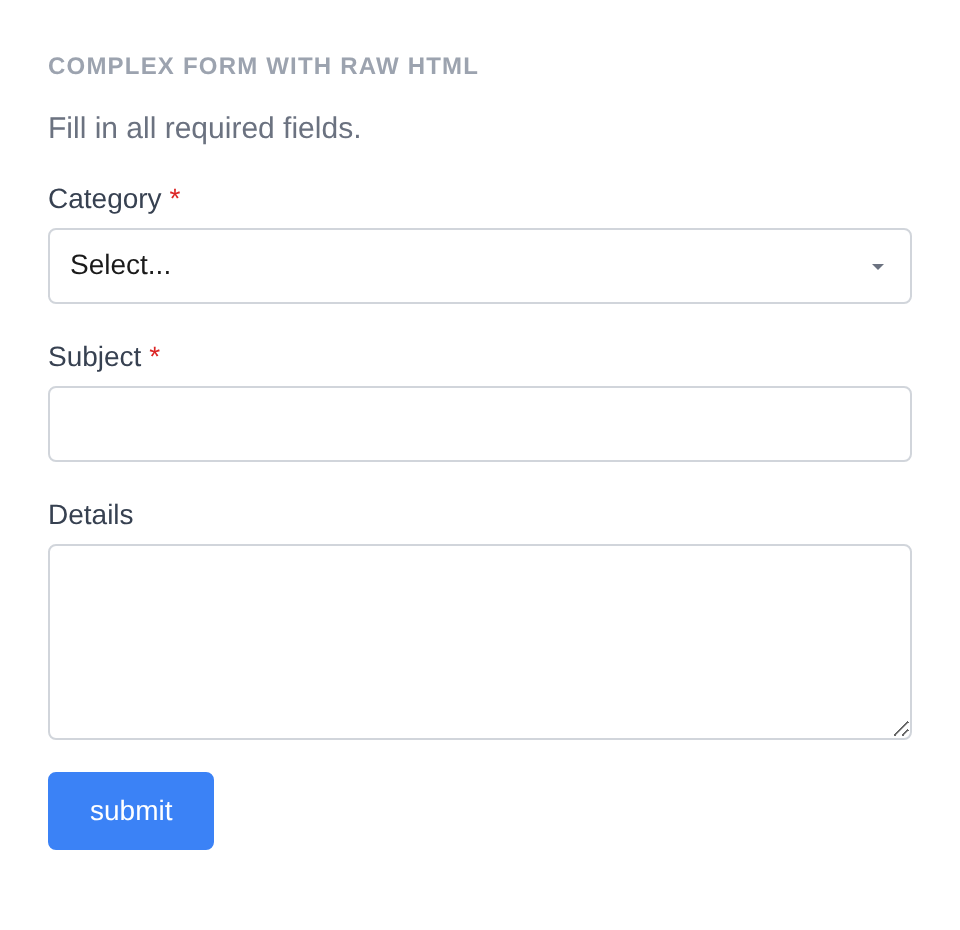
Generated HTML
<form id="form-complex_form" class="pc-form" method="POST">
    <p style="color:#6b7280;margin:0 0 12px">Fill in all required fields.</p>
        <div id="form-field_category" class="pc-form__element pc-form__element--select">
            <label for="category" class="pc-form__label">Category</label>
                <select name="category" class="form-control select pc-form__element__field pc-form__element__field--select" required="" >
                    <option value="" >Select...</option>
                    <option value="bug" >Bug Report</option>
                    <option value="feature" >Feature Request</option>
                </select>
            </div>
            <div id="form-field_subject" class="pc-form__element pc-form__element--text_input">
                <label for="subject" class="pc-form__label">Subject</label>
                    <input type="text" name="subject" class="form-control text-input pc-form__element__field pc-form__element__field--text_input" list="_subject__list" required="" />
                </div>
                <div id="form-field_details" class="pc-form__element pc-form__element--textarea">
                    <label for="details" class="pc-form__label">Details</label>
                        <textarea name="details" class="form-control textarea pc-form__element__field pc-form__element__field--textarea" rows="4" >
                        </textarea>
                    </div>
                    <div id="form-buttonsubmit" class="pc-form__element pc-form__element--button">
                        <button type="submit" name="submit" class="pc-form__button" >submit</button>
                        </div>
                    </form>
Traits
| Trait | Methods |
|---|---|
| Wrapper_Attributes | wrapper_attribute(), wrapper_attributes(), get_wrapper_attribute(), get_wrapper_attributes(), wrapper_id(), wrapper_data(), add_wrapper_class() |
| Element_Wrap | before(), after(), get_before(), get_after(), has_before(), has_after() |
| Fields | fields(), add_field(), get_fields(), get_field(), has_field(), get_field_names(), get_nested_fields(), add_validation_rule(), get_validation_rules() |
| Form_Style | style(), get_style(), has_explicit_style() |