Search Input
Renders <input type="search">. A text input styled for search queries, with browser-native clear controls. Default sanitizer: Sanitize::TEXT.
Class: PinkCrab\Form_Components\Element\Field\Input\Search
Make helper: Make::search( 'name', fn(Search $f) => $f->... )
Basic Usage
$this->component( new Input_Component(
        Search::make( 'search' )
            ->label( 'Search' )
            ->placeholder( 'Search...' )
    ) )

Generated HTML
<div id="form-field_search" class="pc-form__element pc-form__element--search_input">
    <label for="search" class="pc-form__label">Search</label>
        <input type="search" name="search" class="form-control search-input pc-form__element__field pc-form__element__field--search_input" list="_search__list" placeholder="Search..." />
    </div>
Using Make Helper
use PinkCrab\Form_Components\Util\Make;

$this->component( Make::search( 'query', fn( $f ) => $f
    ->label( 'Search' )
    ->placeholder( 'Type to search...' )
) );
Methods
label( string $label )
Sets the visible label text above the input.
Search::make( 'query' )->label( 'Search' )
Generated HTML
<div id="form-field_query" class="pc-form__element pc-form__element--search_input">
    <label for="query" class="pc-form__label">Search</label>
    <input type="search" name="query"
        class="form-control search-input pc-form__element__field pc-form__element__field--search_input"
    />
</div>
set_existing( mixed $value )
Sets the current value. Runs through the sanitizer if one is set.
Search::make( 'query' )
    ->label( 'Search' )
    ->set_existing( 'previous search term' )
Generated HTML
<div id="form-field_query" class="pc-form__element pc-form__element--search_input">
    <label for="query" class="pc-form__label">Search</label>
    <input type="search" name="query"
        class="form-control search-input pc-form__element__field pc-form__element__field--search_input"
        value="previous search term"
    />
</div>
placeholder( string $text )
Placeholder text shown when the field is empty.
Search::make( 'query' )
    ->label( 'Search' )
    ->placeholder( 'Type to search...' )
Generated HTML
<div id="form-field_query" class="pc-form__element pc-form__element--search_input">
    <label for="query" class="pc-form__label">Search</label>
    <input type="search" name="query"
        class="form-control search-input pc-form__element__field pc-form__element__field--search_input"
        placeholder="Type to search..."
    />
</div>
required( bool $required = true )
Marks the field as required. The label displays a * indicator via CSS.
Search::make( 'query' )
    ->label( 'Search' )
    ->required( true )
Generated HTML
<div id="form-field_query" class="pc-form__element pc-form__element--search_input">
    <label for="query" class="pc-form__label">Search</label>
    <input type="search" name="query"
        class="form-control search-input pc-form__element__field pc-form__element__field--search_input"
        required=""
    />
</div>
disabled( bool $disabled = true )
Disables the input. Value is visible but cannot be changed or submitted.
Search::make( 'locked_query' )
    ->label( 'Search' )
    ->set_existing( 'disabled query' )
    ->disabled( true )
Generated HTML
<div id="form-field_locked_query" class="pc-form__element pc-form__element--search_input">
    <label for="locked_query" class="pc-form__label">Search</label>
    <input type="search" name="locked_query"
        class="form-control search-input pc-form__element__field pc-form__element__field--search_input"
        disabled="" value="disabled query"
    />
</div>
readonly( bool $readonly = true )
Makes the field read-only. Value can be selected and copied but not changed.
Search::make( 'readonly_query' )
    ->label( 'Search' )
    ->set_existing( 'read only query' )
    ->readonly( true )
Generated HTML
<div id="form-field_readonly_query" class="pc-form__element pc-form__element--search_input">
    <label for="readonly_query" class="pc-form__label">Search</label>
    <input type="search" name="readonly_query"
        class="form-control search-input pc-form__element__field pc-form__element__field--search_input"
        readonly="" value="read only query"
    />
</div>
pattern( string $regex )
HTML5 validation pattern (regex) the value must match.
Search::make( 'query' )
    ->label( 'Search' )
    ->pattern( '[a-zA-Z0-9\s]+' )
    ->placeholder( 'Letters and numbers only' )
Generated HTML
<div id="form-field_query" class="pc-form__element pc-form__element--search_input">
    <label for="query" class="pc-form__label">Search</label>
    <input type="search" name="query"
        class="form-control search-input pc-form__element__field pc-form__element__field--search_input"
        pattern="[a-zA-Z0-9\s]+" placeholder="Letters and numbers only"
    />
</div>
minlength( int $min ) / maxlength( int $max )
Minimum and maximum character length constraints.
Search::make( 'query' )
    ->label( 'Search' )
    ->minlength( 2 )
    ->maxlength( 100 )
Generated HTML
<div id="form-field_query" class="pc-form__element pc-form__element--search_input">
    <label for="query" class="pc-form__label">Search</label>
    <input type="search" name="query"
        class="form-control search-input pc-form__element__field pc-form__element__field--search_input"
        minlength="2" maxlength="100"
    />
</div>
autocomplete( string $value )
HTML autocomplete attribute to help browsers autofill.
Search::make( 'query' )
    ->label( 'Search' )
    ->autocomplete( 'off' )
Generated HTML
<div id="form-field_query" class="pc-form__element pc-form__element--search_input">
    <label for="query" class="pc-form__label">Search</label>
    <input type="search" name="query"
        class="form-control search-input pc-form__element__field pc-form__element__field--search_input"
        autocomplete="off"
    />
</div>
Common values:
| Value | Description |
|---|---|
off | Disable autocomplete |
on | Enable autocomplete (browser decides) |
name | Full name |
given-name | First name |
family-name | Last name |
email | Email address |
username | Username |
new-password | New password (password managers) |
current-password | Current password |
organization | Company/organisation name |
street-address | Street address |
address-line1 | Address line 1 |
address-line2 | Address line 2 |
address-level2 | City |
address-level1 | State/province/region |
country | Country code |
country-name | Country name |
postal-code | Postcode / ZIP |
tel | Full phone number |
tel-national | Phone without country code |
url | URL |
bday | Full date of birth |
bday-day | Day of birth |
bday-month | Month of birth |
bday-year | Year of birth |
sex | Gender |
cc-name | Cardholder name |
cc-number | Card number |
cc-exp | Card expiry |
cc-csc | Card security code |
inputmode( string $mode )
Hints to mobile browsers which keyboard to display.
Search::make( 'query' )
    ->label( 'Search' )
    ->inputmode( 'search' )
Generated HTML
<div id="form-field_query" class="pc-form__element pc-form__element--search_input">
    <label for="query" class="pc-form__label">Search</label>
    <input type="search" name="query"
        class="form-control search-input pc-form__element__field pc-form__element__field--search_input"
        inputmode="search"
    />
</div>
Valid values:
| Value | Keyboard |
|---|---|
none | No virtual keyboard |
text | Standard text keyboard (default) |
decimal | Numbers with decimal point |
numeric | Numbers only |
tel | Telephone keypad |
search | Search-optimised keyboard |
email | Email-optimised keyboard |
url | URL-optimised keyboard |
spellcheck( string $value )
Enables or disables browser spell checking.
Search::make( 'code_query' )
    ->label( 'Search Code' )
    ->spellcheck( 'false' )
Generated HTML
<div id="form-field_code_query" class="pc-form__element pc-form__element--search_input">
    <label for="code_query" class="pc-form__label">Search Code</label>
    <input type="search" name="code_query"
        class="form-control search-input pc-form__element__field pc-form__element__field--search_input"
        spellcheck="false"
    />
</div>
datalist_items( array $items )
Autocomplete suggestions via an HTML <datalist> element.
Search::make( 'query' )
    ->label( 'Search' )
    ->datalist_items( array( 'Posts', 'Pages', 'Products', 'Categories' ) )
    ->placeholder( 'Start typing...' )
Generated HTML
<div id="form-field_query" class="pc-form__element pc-form__element--search_input">
    <label for="query" class="pc-form__label">Search</label>
    <input type="search" name="query"
        class="form-control search-input pc-form__element__field pc-form__element__field--search_input"
        list="_query__list" placeholder="Start typing..."
    />
    <datalist id="_query__list">
        <option value="Posts"></option>
        <option value="Pages"></option>
        <option value="Products"></option>
        <option value="Categories"></option>
    </datalist>
</div>
error_notification( string $message )
Displays an error message below the field.
Search::make( 'query_error' )
    ->label( 'Search' )
    ->required( true )
    ->error_notification( 'Please enter a search term.' )
Generated HTML
<div id="form-field_query_error" class="pc-form__element pc-form__element--search_input notification-error">
    <label for="query_error" class="pc-form__label">Search</label>
    <input type="search" name="query_error"
        class="form-control search-input pc-form__element__field pc-form__element__field--search_input notification-error"
        required=""
    />
    <div class="pc-form__notification pc-form__notification--error">Please enter a search term.</div>
</div>
warning_notification( string $message )
Displays a warning message below the field.
Search::make( 'query_warning' )
    ->label( 'Search' )
    ->set_existing( 'ab' )
    ->warning_notification( 'Search term is very short.' )
Generated HTML
<div id="form-field_query_warning" class="pc-form__element pc-form__element--search_input notification-warning">
    <label for="query_warning" class="pc-form__label">Search</label>
    <input type="search" name="query_warning"
        class="form-control search-input pc-form__element__field pc-form__element__field--search_input notification-warning"
        value="ab"
    />
    <div class="pc-form__notification pc-form__notification--warning">Search term is very short.</div>
</div>
success_notification( string $message )
Displays a success message below the field.
Search::make( 'query_success' )
    ->label( 'Search' )
    ->set_existing( 'widgets' )
    ->success_notification( '12 results found.' )
Generated HTML
<div id="form-field_query_success" class="pc-form__element pc-form__element--search_input notification-success">
    <label for="query_success" class="pc-form__label">Search</label>
    <input type="search" name="query_success"
        class="form-control search-input pc-form__element__field pc-form__element__field--search_input notification-success"
        value="widgets"
    />
    <div class="pc-form__notification pc-form__notification--success">12 results found.</div>
</div>
info_notification( string $message )
Displays an info message below the field.
Search::make( 'query_info' )
    ->label( 'Search' )
    ->info_notification( 'Search across all post types.' )
Generated HTML
<div id="form-field_query_info" class="pc-form__element pc-form__element--search_input notification-info">
    <label for="query_info" class="pc-form__label">Search</label>
    <input type="search" name="query_info"
        class="form-control search-input pc-form__element__field pc-form__element__field--search_input notification-info"
    />
    <div class="pc-form__notification pc-form__notification--info">Search across all post types.</div>
</div>
pre_description( string $description )
Sets a description or hint displayed before the input.
Search::make( 'query' )
    ->label( 'Search' )
    ->pre_description( 'Search across all content.' )
post_description( string $description )
Sets a description or help text displayed after the input, before any notification.
Search::make( 'query' )
    ->label( 'Search' )
    ->post_description( 'Use quotes for exact match.' )
before( string $html ) / after( string $html )
HTML content before or after the input; renders whether or not the wrapper is shown.
Search::make( 'wrapped_search' )
    ->label( 'Search' )
    ->before( '<span style="color:#6b7280;font-size:13px;">Search the documentation</span>' )
    ->after( '<span style="color:#6b7280;font-size:13px;">Use quotes for exact match</span>' )
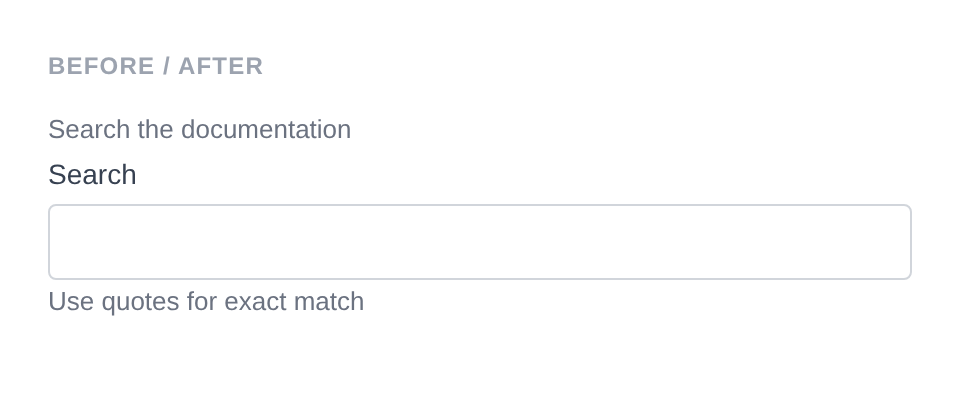
Generated HTML
<div id="form-field_wrapped_search" class="pc-form__element pc-form__element--search_input">
    <span style="color:#6b7280;font-size:13px">Search the documentation</span>
        <label for="wrapped_search" class="pc-form__label">Search</label>
            <input type="search" name="wrapped_search" class="form-control search-input pc-form__element__field pc-form__element__field--search_input" list="_wrapped_search__list" />
            <span style="color:#6b7280;font-size:13px">Use quotes for exact match</span>
            </div>
id( string $id )
Sets a custom HTML id on the input element.
Search::make( 'query' )
    ->id( 'my-custom-search-id' )
Generated HTML
<div id="form-field_query" class="pc-form__element pc-form__element--search_input">
    <input type="search" name="query" id="my-custom-search-id"
        class="form-control search-input pc-form__element__field pc-form__element__field--search_input"
    />
</div>
wrapper_id( string $id )
Sets a custom HTML id on the wrapper div.
Search::make( 'query' )
    ->wrapper_id( 'my-custom-wrapper-id' )
Generated HTML
<div id="my-custom-wrapper-id" class="pc-form__element pc-form__element--search_input">
    <input type="search" name="query"
        class="form-control search-input pc-form__element__field pc-form__element__field--search_input"
    />
</div>
data( string $key, string $value )
Adds a data-* attribute to the input.
Search::make( 'query' )
    ->data( 'live-search', 'true' )
Generated HTML
<div id="form-field_query" class="pc-form__element pc-form__element--search_input">
    <input type="search" name="query"
        class="form-control search-input pc-form__element__field pc-form__element__field--search_input"
        data-live-search="true"
    />
</div>
wrapper_data( string $key, string $value )
Adds a data-* attribute to the wrapper div.
Search::make( 'query' )
    ->wrapper_data( 'section', 'search' )
Generated HTML
<div id="form-field_query" class="pc-form__element pc-form__element--search_input" data-section="search">
    <input type="search" name="query"
        class="form-control search-input pc-form__element__field pc-form__element__field--search_input"
    />
</div>
add_class( string $class )
Adds a CSS class to the input element.
Search::make( 'query' )
    ->add_class( 'my-input-class' )
Generated HTML
<div id="form-field_query" class="pc-form__element pc-form__element--search_input">
    <input type="search" name="query"
        class="form-control search-input pc-form__element__field pc-form__element__field--search_input my-input-class"
    />
</div>
add_wrapper_class( string $class )
Adds a CSS class to the wrapper div.
Search::make( 'query' )
    ->add_wrapper_class( 'my-wrapper-class' )
Generated HTML
<div id="form-field_query" class="pc-form__element pc-form__element--search_input my-wrapper-class">
    <input type="search" name="query"
        class="form-control search-input pc-form__element__field pc-form__element__field--search_input"
    />
</div>
show_wrapper( bool $show = true )
Controls whether the wrapping <div> is rendered.
Search::make( 'bare' )
    ->show_wrapper( false )
Generated HTML
<input type="search" name="bare"
    class="form-control search-input pc-form__element__field pc-form__element__field--search_input"
/>
tabindex( int $index )
Sets the tab order of the input.
Search::make( 'query' )
    ->tabindex( 2 )
Generated HTML
<div id="form-field_query" class="pc-form__element pc-form__element--search_input">
    <input type="search" name="query"
        class="form-control search-input pc-form__element__field pc-form__element__field--search_input"
        tabindex="2"
    />
</div>
attribute( string $key, mixed $value )
Sets an arbitrary HTML attribute on the input.
Search::make( 'query' )
    ->attribute( 'aria-label', 'Search the site' )
Generated HTML
<div id="form-field_query" class="pc-form__element pc-form__element--search_input">
    <input type="search" name="query"
        class="form-control search-input pc-form__element__field pc-form__element__field--search_input"
        aria-label="Search the site"
    />
</div>
attributes( array $attrs )
Sets multiple arbitrary HTML attributes at once.
Search::make( 'query' )
    ->attributes( array(
        'title'    => 'Search the site',
        'tabindex' => '2',
    ) )
Generated HTML
<div id="form-field_query" class="pc-form__element pc-form__element--search_input">
    <input type="search" name="query"
        class="form-control search-input pc-form__element__field pc-form__element__field--search_input"
        title="Search the site" tabindex="2"
    />
</div>
sanitizer( callable $fn )
Sets a sanitization callback applied when set_existing() is called. Default: Sanitize::TEXT. Accepts any callable - a built-in helper constant, a WordPress function name, a closure, or any invokable.
Using a built-in helper:
use PinkCrab\Form_Components\Util\Sanitize;

Search::make( 'query' )
    ->sanitizer( Sanitize::TEXT )
    ->set_existing( '<script>alert("xss")</script>widgets' ) // Stores: "widgets"
Using a custom callable:
Search::make( 'query' )
    ->sanitizer( function( $value ) {
        return strtolower( trim( $value ) );
    } )
    ->set_existing( '  My Search  ' ) // Stores: "my search"
Using a WordPress function:
Search::make( 'query' )
    ->sanitizer( 'sanitize_text_field' )
    ->set_existing( $user_input )
Built-in sanitizer helpers:
| Constant | Function | Description |
|---|---|---|
Sanitize::TEXT | sanitize_text_field() | Strips tags, removes extra whitespace |
Sanitize::TEXTAREA | sanitize_textarea_field() | Like TEXT but preserves line breaks |
Sanitize::URL | esc_url_raw() | Sanitises a URL for database storage |
Sanitize::EMAIL | sanitize_email() | Strips invalid email characters |
Sanitize::HEX_COLOR | sanitize_hex_color() | Validates hex colour (#fff or #ffffff) |
Sanitize::NUMBER | Custom numeric parser | Parses to int or float |
Sanitize::NOOP | Pass-through | No sanitization applied |
Each helper can also be called as a static method:
$clean = Sanitize::text( '<b>Hello</b>' );    // "Hello"
$clean = Sanitize::email( 'bad@@email' );      // "bad@email"
$clean = Sanitize::number( '42.5abc' );         // 42.5
validator( Validator $validator )
Sets a Respect\Validation validator for server-side validation.
use Respect\Validation\Validator as v;

Search::make( 'query' )
    ->validator( v::stringType()->length( 2, 100 ) )
style( Style $style )
Sets a custom style for the field, overriding the default.
use PinkCrab\Form_Components\Style\Default_Style;

Search::make( 'query' )
    ->style( new Default_Style() )
Traits
| Trait | Methods |
|---|---|
| Label | label(), get_label(), has_label() |
| Single_Value | value(), get_value(), has_value() |
| Placeholder | placeholder(), get_placeholder(), has_placeholder() |
| Required | required(), is_required() |
| Disabled | disabled(), is_disabled() |
| Read_Only | readonly(), is_read_only() |
| Pattern | pattern(), get_pattern(), has_pattern() |
| Datalist | datalist_items(), get_datalist_key(), get_datalist_items() |
| Length | minlength(), maxlength(), get_min_length(), get_max_length() |
| Autocomplete | autocomplete(), get_autocomplete(), has_autocomplete() |
| Input_Mode | inputmode(), get_input_mode(), has_input_mode() |
| Spellcheck | spellcheck(), is_spellcheck() |
| Description | pre_description(), post_description(), get_pre_description(), get_post_description(), has_pre_description(), has_post_description() |
| Notification | error_notification(), warning_notification(), success_notification(), info_notification() |